分布式事务:从理论到实践(二)
前文 分布式事务:从理论到实践(一)我们提到了Seata的AT和TCC模式,本文中我们针对这两个模式进行深入分析和开发实践。
AT 模式
原理回顾
根据 官方文档[1] 及提供的 博客[2] 我们先回顾一下AT模式下分布式事务的原理
AT 模式的一阶段、二阶段提交和回滚均由 Seata 框架自动生成,用户只需编写“业务 SQL”,便能轻松接入分布式事务,AT 模式是一种对业务无任何侵入的分布式事务解决方案。
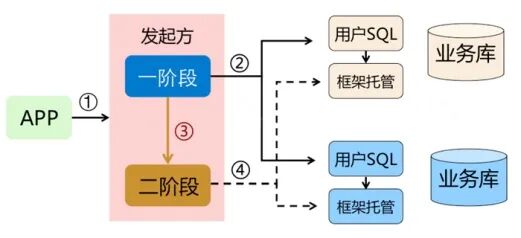
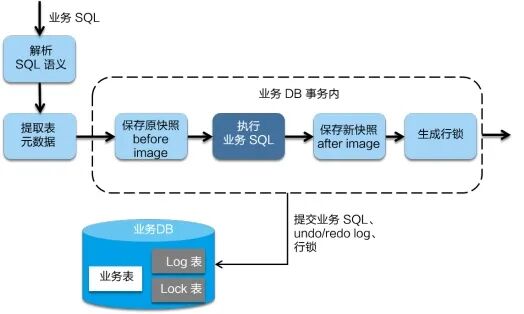
一阶段:在一阶段,Seata 会拦截“业务 SQL”,首先解析 SQL 语义,找到“业务 SQL”要更新的业务数据,在业务数据被更新前,将其保存成“before image”,然后执行“业务 SQL”更新业务数据,在业务数据更新之后,再将其保存成“after image”,最后生成行锁。以上操作全部在一个数据库事务内完成,这样保证了一阶段操作的原子性。
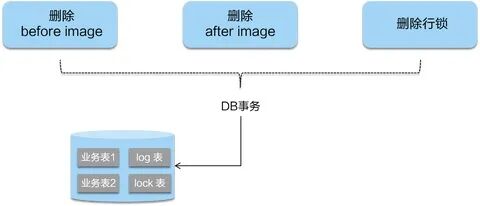
二阶段提交:二阶段如果是提交的话,因为“业务 SQL”在一阶段已经提交至数据库, 所以 Seata 框架只需将一阶段保存的快照数据和行锁删掉,完成数据清理即可。
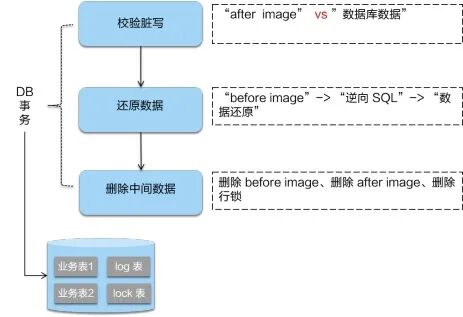
- 二阶段回滚:二阶段如果是回滚的话,Seata 就需要回滚一阶段已经执行的“业务 SQL”,还原业务数据。回滚方式便是用“before image”还原业务数据;但在还原前要首先要校验脏写,对比“数据库当前业务数据”和 “after image”,如果两份数据完全一致就说明没有脏写,可以还原业务数据,如果不一致就说明有脏写,出现脏写就需要转人工处理。
环境搭建
本文demo使用的环境是基于
- SpringBoot
- Spring Cloud Alibaba
- Nacos
- Apollo
- docker compose
首先将 seata-server 在服务器搭建起来,由于我们使用 nacos作为seata的注册中心、apollo为注册中心,所以先将这两个组件搭建起来,具体的安装方法请分别参考各自的官方文档。nacos[3] apollo[4]
nacos 和 apollo 搭起来以后,我们开始搭建 seata-server 以下是 docker-compose 的配置:
 1
 2version: "3.1"
 3services:
 4  seata-server:
 5    image: seataio/seata-server:latest
 6    hostname: seata-server
 7    ports:
 8      - 8091:8091
 9    environment:
10      - SEATA_PORT=8091
11      - SEATA_IP={你的IP}
12      - SEATA_CONFIG_NAME=file:/seata-server/resources/registry
13    volumes:
14      - ./seata/registry.conf:/seata-server/resources/registry.conf
15    expose:
16      - 8091
修改 registry.conf 配置文件,由于我们使用 nacos 作为注册中心,apollo 作为配置中心,所以需要修改到以下配置:
 1registry {
 2  # file 、nacos 、eureka、redis、zk、consul、etcd3、sofa
 3  type = "nacos"
 4  loadBalance = "RandomLoadBalance"
 5  loadBalanceVirtualNodes = 10
 6  nacos {
 7    application = "seata-server"
 8    serverAddr = "你的IP:端口"
 9    group = "SEATA_GROUP"
10    namespace = ""
11    cluster = "default"
12    username = ""
13    password = ""
14  }
15}
16
17config {
18  # file、nacos 、apollo、zk、consul、etcd3
19  type = "apollo"
20  apollo {
21    appId = "seata-server"
22    apolloMeta = "http://你的IP:端口"
23    namespace = "application"
24    env= "dev"
25    apolloAccesskeySecret = ""
26  }
27
28}
注意:seata-server 是可以配置数据库存储 seata 所用数据的,我们为了方便利用本地 file 的方式存储数据,所以没有再做数据库的配置。如需修改可以修改配置文件 file.conf
下面是 file.conf 的默认配置:
 1store {
 2  ## store mode: file、db、redis
 3  mode = "file"
 4
 5  ## file store property
 6  file {
 7    ## store location dir
 8    dir = "sessionStore"
 9    # branch session size , if exceeded first try compress lockkey, still exceeded throws exceptions
10    maxBranchSessionSize = 16384
11    # globe session size , if exceeded throws exceptions
12    maxGlobalSessionSize = 512
13    # file buffer size , if exceeded allocate new buffer
14    fileWriteBufferCacheSize = 16384
15    # when recover batch read size
16    sessionReloadReadSize = 100
17    # async, sync
18    flushDiskMode = async
19  }
20
21  ## database store property
22  db {
23    ## the implement of javax.sql.DataSource, such as DruidDataSource(druid)/BasicDataSource(dbcp)/HikariDataSource(hikari) etc.
24    datasource = "druid"
25    ## mysql/oracle/postgresql/h2/oceanbase etc.
26    dbType = "mysql"
27    driverClassName = "com.mysql.jdbc.Driver"
28    url = "jdbc:mysql://127.0.0.1:3306/seata"
29    user = "mysql"
30    password = "mysql"
31    minConn = 5
32    maxConn = 100
33    globalTable = "global_table"
34    branchTable = "branch_table"
35    lockTable = "lock_table"
36    queryLimit = 100
37    maxWait = 5000
38  }
39
40  ## redis store property
41  redis {
42    host = "127.0.0.1"
43    port = "6379"
44    password = ""
45    database = "0"
46    minConn = 1
47    maxConn = 10
48    maxTotal = 100
49    queryLimit = 100
50  }
51
52}
启动 nacos、apollo、seata-server
当显示以下信息时,代表seata-server启动了。
这时我们查看 nacos ,也注册上了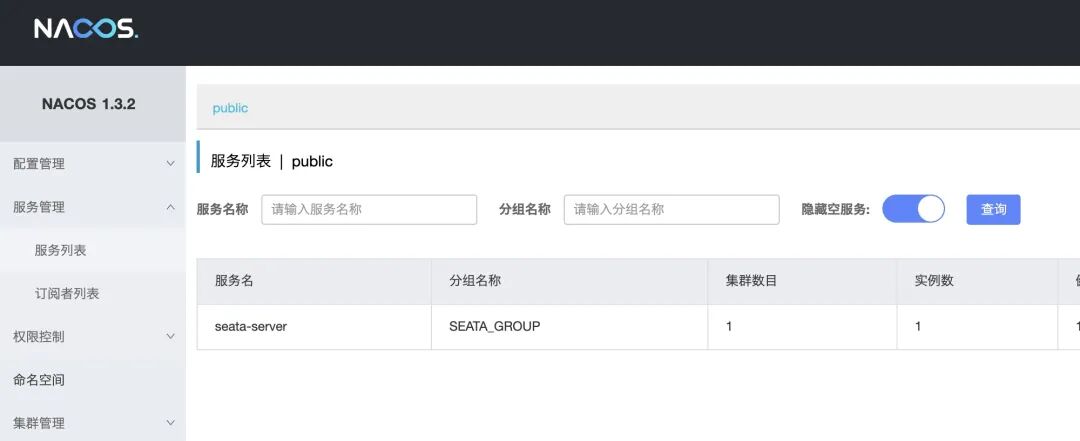
apollo 中我们添加一个名为 service.vgroup-mapping.demo-service-seata的key ,value为 default,至于这个的作用,我们后面再说。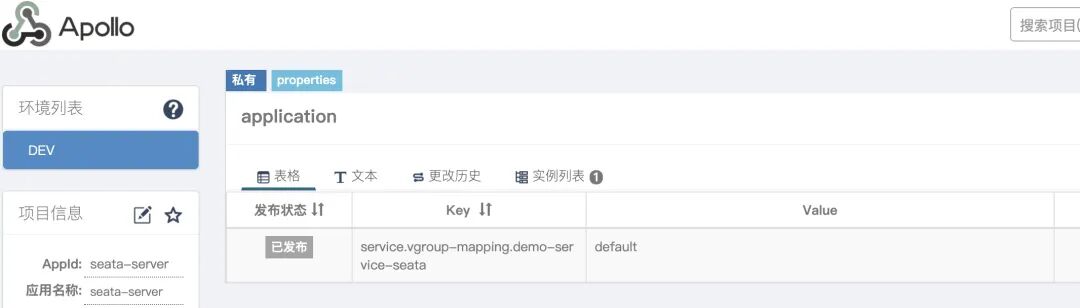
我们的 demo 中包含三个服务
- demo-order
- demo-storage
- demo-user
服务间调用使用的是Spring Cloud OpenFeign,除了 SpringBoot 和Spring Cloud 等基础 bom 要依赖外,还需要加入 seata 的依赖,我的pom,大致如下:
 1<properties>
 2        <spring-boot-dependencies.version>2.3.2.RELEASE</spring-boot-dependencies.version>
 3        <spring-cloud-dependencies.version>Hoxton.SR8</spring-cloud-dependencies.version>
 4        <spring-cloud-alibaba-dependencies.version>2.2.3.RELEASE</spring-cloud-alibaba-dependencies.version>
 5</properties>
 6
 7    <dependencyManagement>
 8        <dependencies>
 9            <dependency>
10                <groupId>org.springframework.boot</groupId>
11                <artifactId>spring-boot-starter-parent</artifactId>
12                <version>${spring-boot-dependencies.version}</version>
13                <type>pom</type>
14                <scope>import</scope>
15            </dependency>
16            <dependency>
17                <groupId>org.springframework.cloud</groupId>
18                <artifactId>spring-cloud-dependencies</artifactId>
19                <version>${spring-cloud-dependencies.version}</version>
20                <type>pom</type>
21                <scope>import</scope>
22            </dependency>
23            <dependency>
24                <groupId>com.alibaba.cloud</groupId>
25                <artifactId>spring-cloud-alibaba-dependencies</artifactId>
26                <version>${spring-cloud-alibaba-dependencies.version}</version>
27                <type>pom</type>
28                <scope>import</scope>
29            </dependency>
30        </dependencies>
31    </dependencyManagement>
32
33    <dependencies>
34        <!-- 实现对 Spring MVC 的自动化配置 -->
35        <dependency>
36            <groupId>org.springframework.boot</groupId>
37            <artifactId>spring-boot-starter-web</artifactId>
38        </dependency>
39
40        <!-- 引入 Spring Cloud Alibaba Seata 相关依赖,使用 Seata 实现分布式事务,并实现对其的自动配置 -->
41        <dependency>
42            <groupId>io.seata</groupId>
43            <artifactId>seata-spring-boot-starter</artifactId>
44        </dependency>
45
46        <dependency>
47            <groupId>com.alibaba.cloud</groupId>
48            <artifactId>spring-cloud-starter-alibaba-seata</artifactId>
49        </dependency>
50
51        <!-- 引入 Spring Cloud Alibaba Nacos Discovery 相关依赖,将 Nacos 作为注册中心,并实现对其的自动配置 -->
52        <dependency>
53            <groupId>com.alibaba.cloud</groupId>
54            <artifactId>spring-cloud-starter-alibaba-nacos-discovery</artifactId>
55        </dependency>
56
57        <!-- 引入 Spring Cloud OpenFeign 相关依赖,使用 OpenFeign 提供声明式调用,并实现对其的自动配置 -->
58        <dependency>
59            <groupId>org.springframework.cloud</groupId>
60            <artifactId>spring-cloud-starter-openfeign</artifactId>
61        </dependency>
62    </dependencies>
至于项目中所用ORM框架,数据库连接池等就因人而异了,我用的是mybatis-plus和hikari,数据库用的是 mysql5.7。
针对上面的三个服务分别创建三个数据库,order、user、storage,并在每个库中分别创建一个业务表 t_order、t_user、t_storage 这里就不贴建库表的脚本了,大家可以按照自己的设计自己建,需要注意的是每个库都需要再创建一个 undo_log 表,这是为seata做分布式事务回滚所用。
 1CREATE TABLE `undo_log` (
 2  `id` bigint(20) NOT NULL AUTO_INCREMENT,
 3  `branch_id` bigint(20) NOT NULL,
 4  `xid` varchar(100) NOT NULL,
 5  `context` varchar(128) NOT NULL,
 6  `rollback_info` longblob NOT NULL,
 7  `log_status` int(11) NOT NULL,
 8  `log_created` datetime NOT NULL,
 9  `log_modified` datetime NOT NULL,
10  PRIMARY KEY (`id`),
11  UNIQUE KEY `ux_undo_log` (`xid`,`branch_id`)
12) ENGINE=InnoDB AUTO_INCREMENT=1 DEFAULT CHARSET=utf8;
每个服务中 application.yml 中对应 seata 的配置如下
 1
 2spring:
 3  profiles:
 4    active: dev
 5  cloud:
 6    nacos:
 7      discovery:
 8        namespace: public
 9        password: nacos
10        server-addr: IP:PORT
11        networkInterface: eth1
12        username: nacos
13
14# Seata 配置项,对应 SeataProperties 类
15seata:
16  application-id: ${spring.application.name} # Seata 应用编号,默认为 ${spring.application.name}
17  tx-service-group: demo-service-seata # Seata 事务组编号,用于 TC 集群名
18  # Seata 服务配置项,对应 ServiceProperties 类
19  service:
20    # 虚拟组和分组的映射
21    vgroup-mapping:
22      demo-service-seata: default
23  # Seata 注册中心配置项,对应 RegistryProperties 类
24  registry:
25    type: nacos # 注册中心类型,默认为 file
26    nacos:
27      cluster: default # 使用的 Seata 分组
28      namespace: # Nacos 命名空间
29      serverAddr: 你的IP:端口 # Nacos 服务地址
这里有几点需要注意:
demo-service-seata出现了两次,这两个地方要写成一样demo-service-seata: default与我们在 apollo 中配置的要一样
与 seata-server registry.conf 中 nacos 的 cluster 配置一样。
nacos 配置
networkInterface: eth1这样写是因为服务部署在服务器后用的内网IP注册到了nacos,想配置它用外网地址就改了下走特定网卡。
解决方案参考:这里[5]例如,使用了Spring cloud alibaba(官方文档)作为Nacos客户端,服务默认获取了内网IP 192.168.1.21,可以通过配置 spring.cloud.inetutils.preferred-networks=10.34.12,使服务获取内网中前缀为10.34.12的IP
在老版本的 seata 是需要手动设置 DataSourceProxy的 ,参考 官网文档[6] 新版本的默认是自动代理的,不需要再写了。

至此我们的环境搭建和准备工作就结束了。
分布式事务具体代码
我们设计这样一个同步的业务流程,创建订单前先扣减库存,再扣减账户余额,然后再创建订单,demo设计上参考了 芋道源码[7]。大致流程如下图: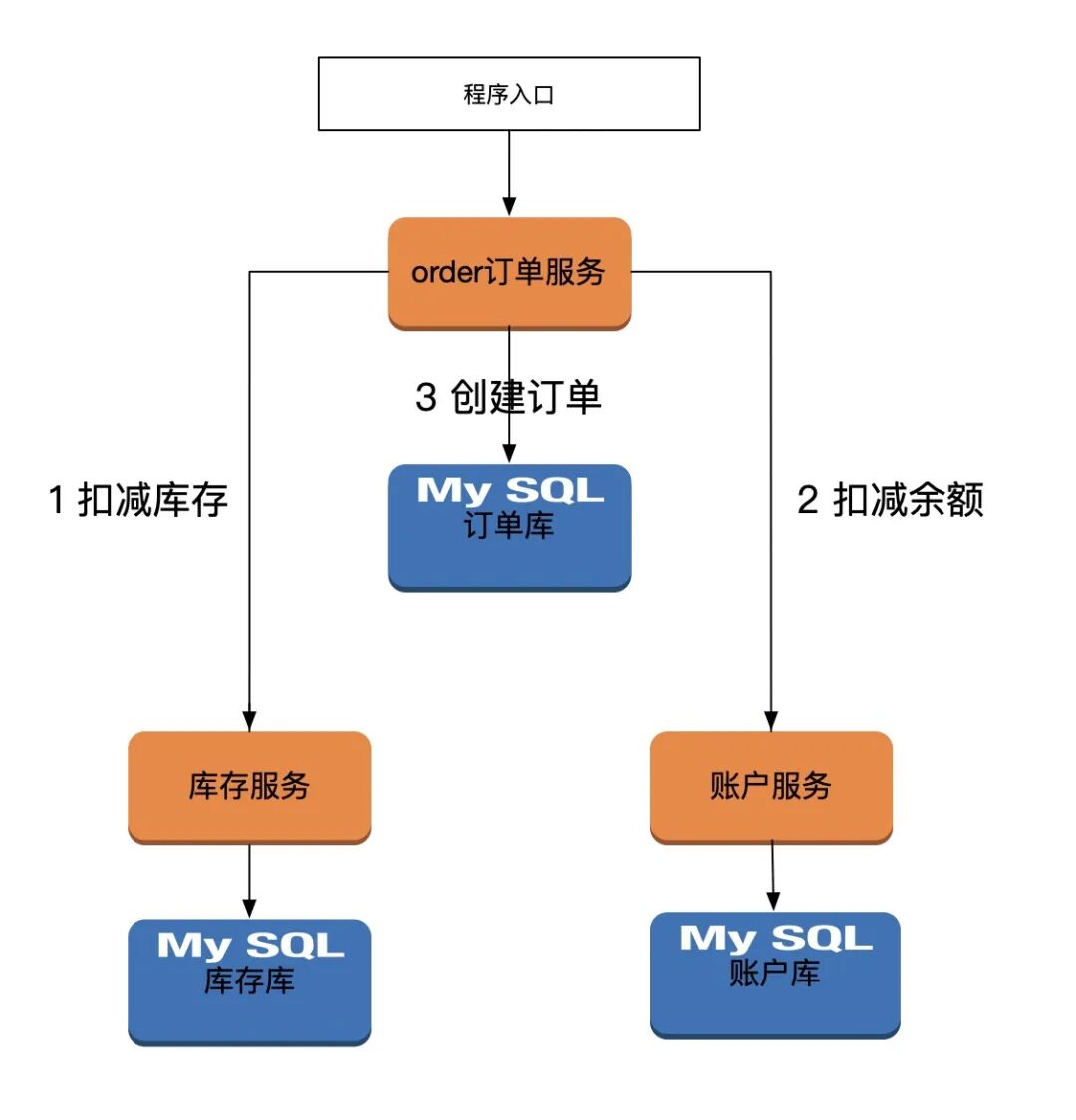
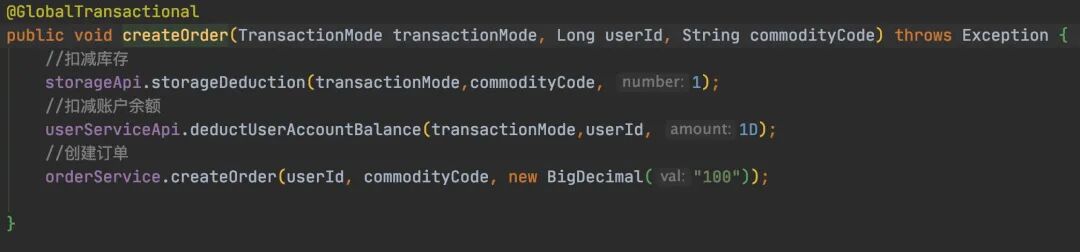 通过入口进入orderServicer后,进行上面的三步流程,分别调用两个微服务,再调自己的订单服务,这里注意两点:
- 分布式全局事务入口,要添加 @GlobalTransactional
- 要抛出异常
接下来是扣减库存微服务部分,简单做了下扣减,小于10抛出异常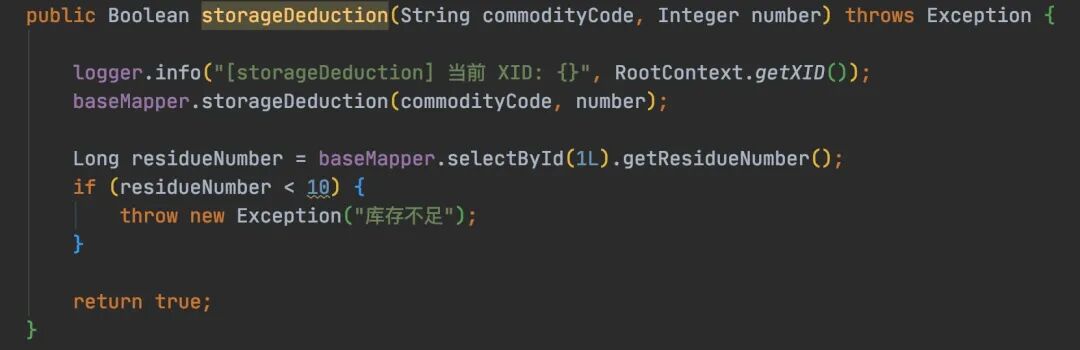
然后是账户微服务部分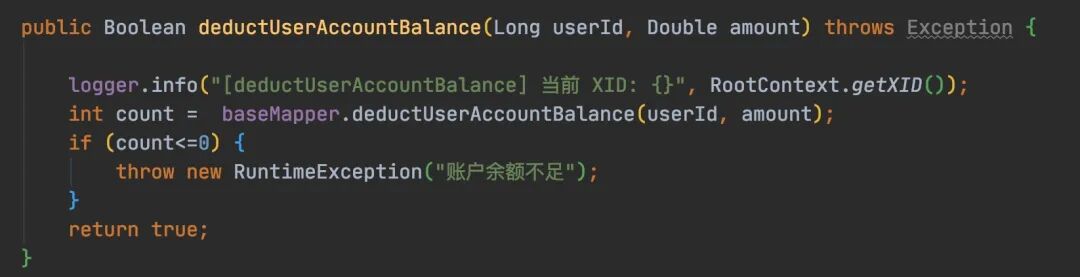
最后是订单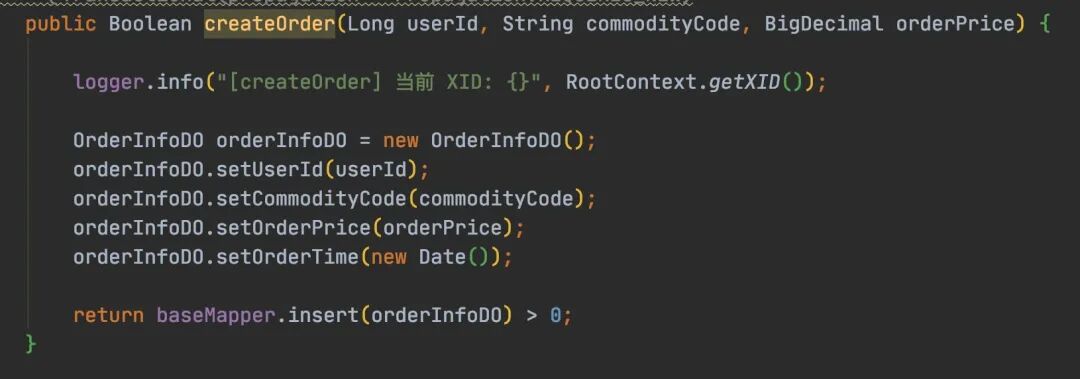
代码都比较简单,有几个点需要注意下
- 全局事务的隔离性和本地事务的不是一个概念。
- 全局事务的隔离级别一定基础上依赖本地事务的隔离级别。因此本地事务的隔离级别只要大于等于seata支持的隔离级别就行,所以一般数据库的默认级别就可以
- seata的全局事务注解是@GlobalTransactional,@Transactional 是spring的注解,解决本地事务问题,属于两种不同粒度的事务范畴。
- 如果要加全局事务就一定要用 @GlobalTransactional。
- 在一个事务方法上,是可以叠加两个注解的,仅意味着功能的叠加,即:有本地事务的处理,也有全局事务的加持。两者不冲突。
由于在数据库本地事务隔离级别 读已提交(Read Committed) 或以上的基础上,Seata(AT 模式)的默认全局隔离级别是 读未提交(Read Uncommitted) 。
所以这种隔离性会带来问题(注意这里说的是全局事务):
脏读:一个事务读取到另一个事务未提交的数据 解决方案:
@GlobalLock+@Transactional 注解 + select语句加for update 或
GlobalTransactional注解+select语句加for update
脏写:一个事务提交的数据覆盖了另一个事务未提交的数据 解决方案:必须使用@GlobalTransaction
其实上面这部分,官方文档也写的很清楚,尤其对于隔离性的解析: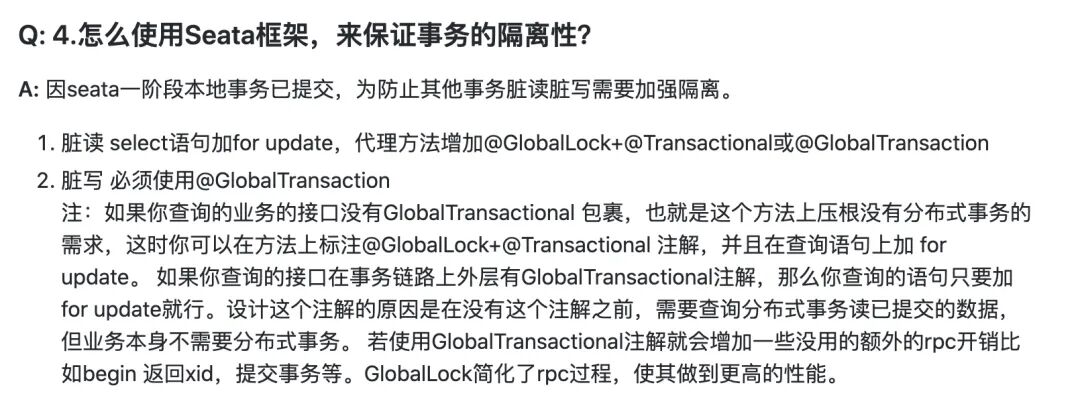
上图有些地方理解起来要注意:
- 这里说的事务指的是全局的分布式事务,别想成本地事务了,
- 关于@GlobalLock,场景是一个是全局分布式事务,另一个不是分布式事务,如果你想让分布式事务不产生“脏读”,那么可以在另一个非分布式事务上加@GlobalLock。
我的测试中事务的正常执行和回滚都没有问题,如果你观察各数据库的 undo_log 表,可能会发现没有数据,但实际情况是数据是插入后又很快清除了,所以你没看到,如果你观察主键的 auto_increment 可以看到一直在增长。由于我用了阿里云的RDS,可以通过SQL洞察看到SQL的执行历史,这里看到sql确实执行过。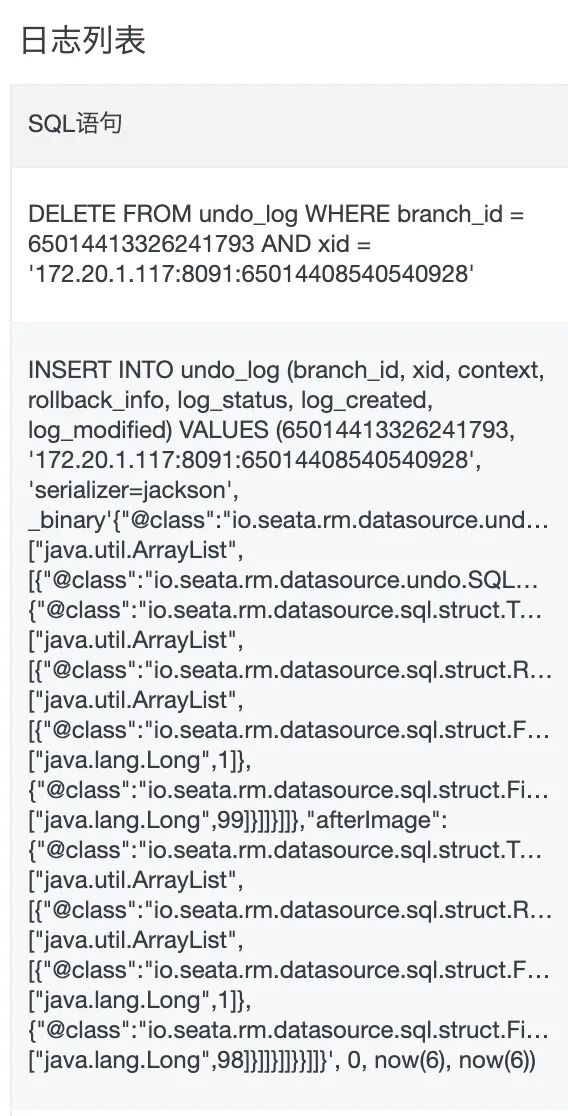
XID是全局事务ID,有时候我们需要获得并进行一些操作,那么可以这样做
1String xid = RootContext.getXID();
2RootContext.unbind();//解绑
3//中途做一些与事务无关的事。比如日志服务等等 排除掉,然后
4RootContext.bind(xid);//再绑回来
@GlobalTransactional也有自己的隔离级别和rollback等,可根据业务情况自行设置
 1package io.seata.spring.annotation;
 2
 3import io.seata.tm.api.transaction.Propagation;
 4import java.lang.annotation.ElementType;
 5import java.lang.annotation.Inherited;
 6import java.lang.annotation.Retention;
 7import java.lang.annotation.RetentionPolicy;
 8import java.lang.annotation.Target;
 9
10@Retention(RetentionPolicy.RUNTIME)
11@Target({ElementType.METHOD, ElementType.TYPE})
12@Inherited
13public @interface GlobalTransactional {
14    int timeoutMills() default 60000;
15
16    String name() default "";
17
18    Class<? extends Throwable>[] rollbackFor() default {};
19
20    String[] rollbackForClassName() default {};
21
22    Class<? extends Throwable>[] noRollbackFor() default {};
23
24    String[] noRollbackForClassName() default {};
25
26    Propagation propagation() default Propagation.REQUIRED;
27}
AT 总结
再次强调AT模式是自动的,它自动帮你做回滚和提交,使用时考虑跟自己的实际业务场景是否适合。
例子中我对执行事务的方法并没有做幂等,在实际生产情况下,一定会出现问题的,所以大家在用的时候要注意做接口幂等处理。
有关更多seata的参数配置,如超时,重试次数等。请参考 官网[8] 。这里当然要结合你的feign的重试和超时时间整体考虑。
通过上文的描述我们利用一个例子将AT模式的全局分布式事务模拟了出来,也总结了一些比较难理解和需要注意的点,希望能够帮助到正在使用seata的小伙伴。
参考资料
[1]
seata官方文档: http://seata.io/zh-cn/docs/overview/what-is-seata.html
[2]
分布式事务 Seata 及其三种模式详解: http://seata.io/zh-cn/blog/seata-at-tcc-saga.html
[3]
nacos官方文档: https://nacos.io/zh-cn/
[4]
apollo的github地址: https://github.com/ctripcorp/apollo
[5]
解决nacos注册内网地址问题: https://www.cnblogs.com/liboware/p/11973321.html
[6]
官网文档: http://seata.io/zh-cn/docs/user/configurations.html
[7]
芋道源码: http://www.iocoder.cn/Spring-Cloud-Alibaba/Seata/
[8]
官网参数配置: http://seata.io/zh-cn/docs/user/configurations.html

关注公众号 获取更多精彩内容