
问题描述
前两天,开发同学发现线上某服务往第三方 API 发出的请求(这个请求是用 openFeign 包装过的),其响应有时为乱码
后来经过测试能够稳定复现问题,开发同学通过分析发现,只要请求的 header 中有 “Accept-Encoding” 且值为 “gzip, deflate, br”,那么响应回来的数据必是乱码。
通过这个现象我们得出结论,即给请求头加了压缩标识,数据也响应回来了,但是并没有解压缩。
知道了原因,那么解决思路无非有二:
- 不压缩了
- 加上解压缩实现
解决方案
第一种思路实现
第一个思路的解决方案即不压缩了,不管 openFeign 之前谁给加了什么 header 参数,我们只要把“Accept-Encoding” 重置就可以了。这里顺便介绍下这个参数详情:
Accept-Encoding 和 Content-Encoding 是 HTTP 中用来对采用何种压缩格式传输正文进行协定的一对 header。工作原理如下:
- 浏览器发送请求,通过 Accept-Encoding 带上自己支持的内容编码格式列表
- 服务端从中挑选一个用来对正文进行编码,并通过 Content-Encoding 响应头指明响应编码格式。
- 浏览器拿到响应正文后,根据 Content-Encoding 进行解压缩。服务端若响应未压缩的正文,则不允许返回 Content-Encoding。
压缩类型:
- gzip:表示采用 Lempel-Ziv coding (LZ77) 压缩算法,以及 32 位 CRC 校验的编码方式
- Compress:采用 Lempel-Ziv-Welch (LZW) 压缩算法。
- deflate:表示采用 zlib 结构 (在 RFC 1950 中规定),和 deflate 压缩算法(在 RFC 1951 中规定)。
- identity:用于指代自身(未经过压缩和修改)。除非特别指明,这个标记始终可以被接受。
- Br:表示采用 Brotli 算法的编码方式。内容编码:
- 内容编码针对的只是传输正文。HTTP/1 中,header 始终是以 ASCII 文本传输,没有经过任何压缩;HTTP/2 中引入 header 压缩技术。
所以我们下 2 种方法都是基于设置 “identity:用于指代自身(未经过压缩和修改)”,告诉请求不用压缩了,自然也就不用解压了。
httpclient
在原始 feign 配置下,仍然利用 httpclient 作为 http 代理,不用 okhttp
 1
 2package com.my.fedex.kuaidi100.rest;
 3
 4import com.my.fedex.common.constants.FedexConstants;
 5import org.springframework.cloud.openfeign.FeignClient;
 6import org.springframework.web.bind.annotation.PostMapping;
 7import org.springframework.web.bind.annotation.RequestParam;
 8
 9@FeignClient(name = "kuaidi100", url = FedexConstants.KUAIDI100_QUERY_URL, fallbackFactory = KuaiDi100FeignFallBack.class)
10//@RequestMapping(value = "/", headers = {"Accept-Encoding=identity"})
11public interface KuaiDi100Feign {
12
13
14    @PostMapping(headers = {"Accept-Encoding=identity"})
15    String findKuaiDi100(@RequestParam("customer") String customer,
16                         @RequestParam("sign") String sign,
17                         @RequestParam("param") String param);
18}
只需将方法上的 postMapping 添加入一个新的 headers 即可,这个方法之前是这样声明的:
1
2@PostMapping
3String findKuaiDi100(@RequestParam("customer") String customer,
4                         @RequestParam("sign") String sign,
5                         @RequestParam("param") String param);
或者也可以用原来的方法和方法上的 @PostMapping 声明,把接口上的注释打开即可。
okhttp
在我的测试中,如果客户端代理用 okhttp , 那么会报一个错,主要信息为
1java.io.EOFException: \n not found: limit=0 content=…
报这个的原因是 response 响应回来的内容为空 也就是 content-size 是 0 。那又是为什么呢?
原因是:请求的 host 不对,我本地请求的 host 居然变成了 “localhost:8080”,显然我们请求对方接口的 host 应该为:“poll.kuaidi100.com”。这个现象只有在用 okhttp 时会这样,想来应该是透传了请求客户端的 host ,而 okhttp 没有计算对最终目标的 host。
解决方法也很简单,是基于上面的方案再多加一个 header,最终为:
1@PostMapping(headers = {"Accept-Encoding=identity","host=poll.kuaidi100.com"})
总结:无论是利用 httpclient 还是 okhttp 都可以通过添加 headers 解决乱码的问题。但 okhttp 比较特殊要多加一个 host 。
第二种思路实现
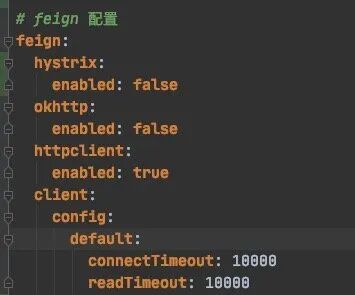
第二种思路即加上压缩,根据 spring 官方文档得知,httpclient 是可以直接配置 response 的解压实现的(人家 feign 都实现好了), 配置方法也很简单,如下图所示:

需要注意的是,也是文档中所写的,它不支持 okhttp,也就是说如果我们用 okhttp 代理不能这么干。
那么问题来了,如果用 okhttp 怎么办,也是有办法的,但是是相对最麻烦的一种,目前想到的是自己手动实现一个解码器了,比如:
 1import feign.Response;
 2import feign.Util;
 3import feign.codec.Decoder;
 4import org.springframework.cloud.openfeign.encoding.HttpEncoding;
 5
 6import java.io.BufferedReader;
 7import java.io.ByteArrayInputStream;
 8import java.io.IOException;
 9import java.io.InputStreamReader;
10import java.lang.reflect.Type;
11import java.nio.charset.StandardCharsets;
12import java.util.Collection;
13import java.util.Objects;
14import java.util.zip.GZIPInputStream;
15
16public class CustomGZIPResponseDecoder implements Decoder {
17
18    final Decoder delegate;
19
20    public CustomGZIPResponseDecoder(Decoder delegate) {
21        Objects.requireNonNull(delegate, "Decoder must not be null. ");
22        this.delegate = delegate;
23    }
24
25    @Override
26    public Object decode(Response response, Type type) throws IOException {
27        Collection<String> values = response.headers().get(HttpEncoding.CONTENT_ENCODING_HEADER);
28        if(Objects.nonNull(values) && !values.isEmpty() && values.contains(HttpEncoding.GZIP_ENCODING)){
29            byte[] compressed = Util.toByteArray(response.body().asInputStream());
30            if ((compressed == null) || (compressed.length == 0)) {
31               return delegate.decode(response, type);
32            }
33            //decompression part
34            //after decompress we are delegating the decompressed response to default
35            //decoder
36            if (isCompressed(compressed)) {
37                final StringBuilder output = new StringBuilder();
38                final GZIPInputStream gis = new GZIPInputStream(new ByteArrayInputStream(compressed));
39                final BufferedReader bufferedReader = new BufferedReader(new InputStreamReader(gis, StandardCharsets.UTF_8));
40                String line;
41                while ((line = bufferedReader.readLine()) != null) {
42                    output.append(line);
43                }
44                Response uncompressedResponse = response.toBuilder().body(output.toString().getBytes()).build();
45                return delegate.decode(uncompressedResponse, type);
46            }else{
47                return delegate.decode(response, type);
48            }
49        }else{
50            return delegate.decode(response, type);
51        }
52    }
53
54    private static boolean isCompressed(final byte[] compressed) {
55        return (compressed[0] == (byte) (GZIPInputStream.GZIP_MAGIC)) && (compressed[1] == (byte) (GZIPInputStream.GZIP_MAGIC >> 8));
56    }
57}
根据官方文档的描述还是比较容易设置的。
另外,下面这位网友给出了实践操作:https://stackoverflow.com/questions/51901333/okhttp-3-how-to-decompress-gzip-deflate-response-manually-using-java-android 也就是自己 new okHttpClient 然后设置一个 interceptor
 1OkHttpClient.Builder clientBuilder = new OkHttpClient.Builder().addInterceptor(new UnzippingInterceptor());
 2OkHttpClient client = clientBuilder.build();
 3
 4private class UnzippingInterceptor implements Interceptor {
 5    @Override
 6    public Response intercept(Chain chain) throws IOException {
 7        Response response = chain.proceed(chain.request());
 8        return unzip(response);
 9    }
10
11
12// copied from okhttp3.internal.http.HttpEngine (because is private)
13private Response unzip(final Response response) throws IOException {
14    if (response.body() == null)
15    {
16        return response;
17    }
18
19    //check if we have gzip response
20    String contentEncoding = response.headers().get("Content-Encoding");
21
22    //this is used to decompress gzipped responses
23    if (contentEncoding != null && contentEncoding.equals("gzip"))
24    {
25        Long contentLength = response.body().contentLength();
26        GzipSource responseBody = new GzipSource(response.body().source());
27        Headers strippedHeaders = response.headers().newBuilder().build();
28        return response.newBuilder().headers(strippedHeaders)
29                .body(new RealResponseBody(response.body().contentType().toString(), contentLength, Okio.buffer(responseBody)))
30                .build();
31    }
32    else
33    {
34        return response;
35    }
36}
基于上面这位网友的,给出我自己的代码实现:
首先,自己生成 client, 加入自己的 interceptor。
 1package com.my.fedex.kuaidi100.config;
 2
 3import feign.Client;
 4import feign.Feign;
 5import okhttp3.ConnectionPool;
 6import okhttp3.OkHttpClient;
 7import org.springframework.boot.autoconfigure.AutoConfigureAfter;
 8import org.springframework.boot.autoconfigure.condition.ConditionalOnClass;
 9import org.springframework.boot.autoconfigure.condition.ConditionalOnMissingBean;
10import org.springframework.cloud.commons.httpclient.OkHttpClientConnectionPoolFactory;
11import org.springframework.cloud.commons.httpclient.OkHttpClientFactory;
12import org.springframework.cloud.openfeign.FeignAutoConfiguration;
13import org.springframework.cloud.openfeign.support.FeignHttpClientProperties;
14import org.springframework.context.annotation.Bean;
15import org.springframework.context.annotation.Configuration;
16
17import java.util.concurrent.TimeUnit;
18
19/**
20 * @author helong
21 * @since 2021-10-21 23:22
22 */
23@Configuration
24@ConditionalOnClass(Feign.class)
25@AutoConfigureAfter(FeignAutoConfiguration.class)
26public class OkHttpFeignLoadBalancedConfiguration {
27
28    @Bean
29    @ConditionalOnMissingBean({Client.class})
30    public Client feignClient(okhttp3.OkHttpClient client) {
31        return new feign.okhttp.OkHttpClient(client);
32    }
33
34    @Bean
35    @ConditionalOnMissingBean({ConnectionPool.class})
36    public ConnectionPool httpClientConnectionPool(FeignHttpClientProperties httpClientProperties, OkHttpClientConnectionPoolFactory connectionPoolFactory) {
37        Integer maxTotalConnections = httpClientProperties.getMaxConnections();
38        Long timeToLive = httpClientProperties.getTimeToLive();
39        TimeUnit ttlUnit = httpClientProperties.getTimeToLiveUnit();
40        return connectionPoolFactory.create(maxTotalConnections, timeToLive, ttlUnit);
41    }
42
43    @Bean
44    public OkHttpClient client(OkHttpClientFactory httpClientFactory, ConnectionPool connectionPool, FeignHttpClientProperties httpClientProperties) {
45        Boolean followRedirects = httpClientProperties.isFollowRedirects();
46        Integer connectTimeout = httpClientProperties.getConnectionTimeout();
47        Boolean disableSslValidation = httpClientProperties.isDisableSslValidation();
48        return httpClientFactory.createBuilder(disableSslValidation)
49            .connectTimeout((long) connectTimeout, TimeUnit.MILLISECONDS)
50            .followRedirects(followRedirects)
51            .connectionPool(connectionPool)
52            .retryOnConnectionFailure(true)
53            .addInterceptor(new UnzippingInterceptor())
54            .build();
55    }
56}
自定义 interceptor, 用于解压数据。
 1package com.my.fedex.kuaidi100.config;
 2
 3import okhttp3.Headers;
 4import okhttp3.Interceptor;
 5import okhttp3.Request;
 6import okhttp3.Response;
 7import okhttp3.internal.http.RealResponseBody;
 8import okio.GzipSource;
 9import okio.Okio;
10
11import java.io.IOException;
12
13/**
14 * @author helong
15 * @since 2021-10-21 23:23
16 */
17public class UnzippingInterceptor implements Interceptor {
18    @Override
19    public Response intercept(Chain chain) throws IOException {
20        Request build = chain.request().newBuilder().build();
21        Response response = chain.proceed(build);
22        return unzip(response);
23    }
24
25    // copied from okhttp3.internal.http.HttpEngine (because is private)
26    private Response unzip(final Response response) throws IOException {
27        if (response.body() == null) {
28            return response;
29        }
30
31        //check if we have gzip response
32        String contentEncoding = response.headers().get("Content-Encoding");
33
34        //this is used to decompress gzipped responses
35        if (contentEncoding != null && contentEncoding.equals("gzip")) {
36            Long contentLength = response.body().contentLength();
37            GzipSource responseBody = new GzipSource(response.body().source());
38            Headers strippedHeaders = response.headers().newBuilder().build();
39            return response.newBuilder().headers(strippedHeaders)
40                .body(new RealResponseBody(response.body().contentType().toString(), contentLength, Okio.buffer(responseBody)))
41                .build();
42        } else {
43            return response;
44        }
45    }
46}
最后 feign 请求这里还是不要忘了加 host
1
2@PostMapping(headers = {"host=poll.kuaidi100.com"})
3String findKuaiDi100(@RequestParam("customer") String customer,
4                     @RequestParam("sign") String sign,
5                     @RequestParam("param") String param);
参考
- HTTP 中的 Accept-Encoding、Content-Encoding、Transfer-Encoding、Content-Type - AmyZYX - 博客园 https://www.codeleading.com/article/84154165372/
- https://www.codeleading.com/article/84154165372/
- https://github.com/square/okhttp/issues/3590
- https://stackoverflow.com/questions/57831707/spring-feign-not-compressing-response
- https://cloud.spring.io/spring-cloud-static/spring-cloud-openfeign/2.2.1.RELEASE/reference/html/