概述
在上一篇文章中 如何用 30秒和 5 行代码写个 RAG 应用?,我们介绍了如何利用 LlamaIndex 结合 Ollama 的本地大模型和在 Hugging Face 开源的 embedding 模型用几行 Python 代码轻松构建一个 RAG 应用。
从最终输出的结果上看是满意的,理论上是可以针对本地的知识库内容进行精准的问答。然而执行效率却不尽人意。原因是:无论 LLM 还是 embedding 模型的调用都是在本地,而我本地电脑的性能确属一般(几乎只能利用到 CPU 资源,没有 GPU 资源),这样就导致代码运行速度缓慢。
本文我们将介绍,如何通过调用国产大模型 DeepSeek 的 API 为我们的 RAG 应用提速,我们将把对本地 Ollama 的模型调用替换成对 DeepSeek API 的调用。
对比一下上文和本文的方案:
- 上文:LlamaIndex +
Ollama(Qwen2:7b)+ embedding(BAAI/bge-base-zh-v1.5) - 本文:LlamaIndex +
DeepSeek API+ embedding(BAAI/bge-base-zh-v1.5)
DeepSeek
首先来明确几个问题
为什么不用 OpenAI 的 API?
当然可以,而且 LlamaIndex 默认支持的就是通过 API Key 访问 OpenAI 的 API。问题是成本太高了,有更高性价比的所以不用它。
DeepSeek 是什么 ?
DeepSeek 这个词在不同的上下文中有不同的含义,为了避免概念和语义的混淆,我们在这里分别说明一下:
DeepSeek 代表一个公司:杭州深度求索人工智能基础技术研究有限公司,专注于大模型研发、AI 技术创新和企业解决方案,是幻方量化的子公司。
DeepSeek 代表一个大语言模型 :具有 236B 参数量(2360 亿个参数)的开源大语言模型。严格上讲,DeepSeek 不只是一个单一的模型,而是包含多个针对不同任务和应用场景的模型系列,这些模型在 DeepSeek 的基础上进行了专门的优化和训练,以满足特定的需求,如:
DeepSeek-Chat、DeepSeek-Math、DeepSeek-Coder等。DeepSeek 是一个 API: 由 DeepSeek 公司开发对外提供付费的大模型功能的接口,支持文本生成、对话系统、文本摘要、问答系统和多模态任务等。
在本文中,我们利用 DeepSeek 的 API 间接调用 DeepSeek 所提供的模型,具体模型是 DeepSeek V2.5(DeepSeek V2 Chat 和 DeepSeek Coder V2 两个模型已经合并升级,升级后的新模型为 DeepSeek V2.5)
为什么用 DeepSeek ?
使用 DeepSeek 主要出于成本和效果的综合考虑。
虽然 DeepSeek 是开源大模型(在大模型领域,类似这样的国产中文开源大模型还有许多),但是部署这样的具有大规模参数的模型是需要很多硬件资源的,我们手上的个人电脑没有这个条件。更别说运维和微调这样的模型。所以通过 API 直接调用已经部署好的模型是最便捷的方式,当然,这是有成本的,人家部署和运维这样规模的模型也是需要成本的,所以这些 API 是需要付费使用的。
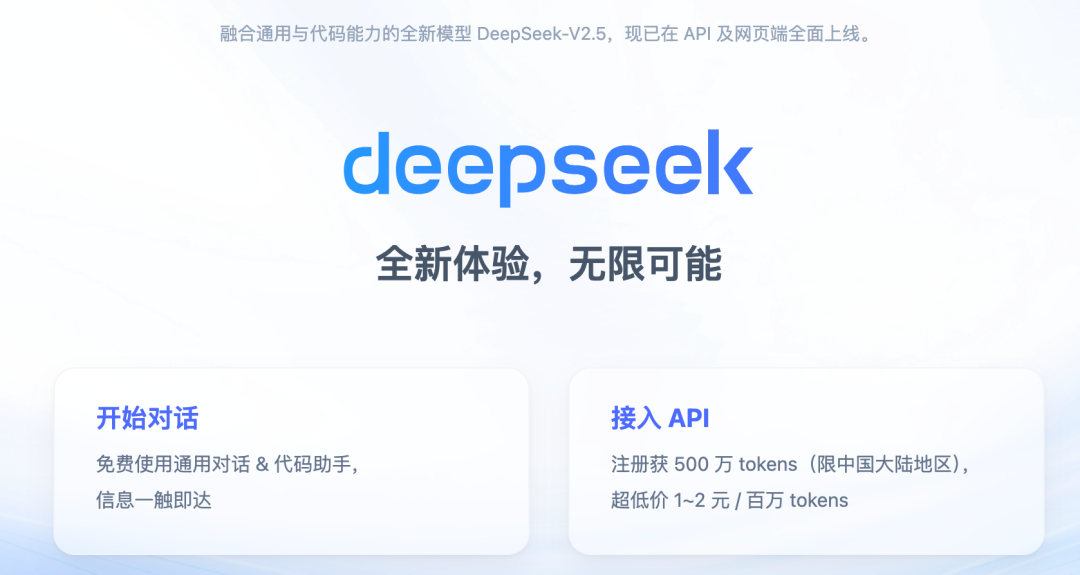
从成本考量,DeepSeek 几乎是最佳方案,因 DeepSeek API 调用价格之便宜曾被戏称为 “AI 界的拼多多”。在 DeepSeek 价格公开后不久,多家模型厂商卷入价格战,现在的模型调用价格是真真正正的被 “打下来”了。多家公司频繁更新自家模型价格,截止目前,可以说 “没有最低,只有更低”。
从效果考量 ,因之前使用过 deepseek-coder、和 deepseek-chat 两个模型,效果上可以说是在中文模型领域的第一梯队。当然这只是我个人的使用体验。
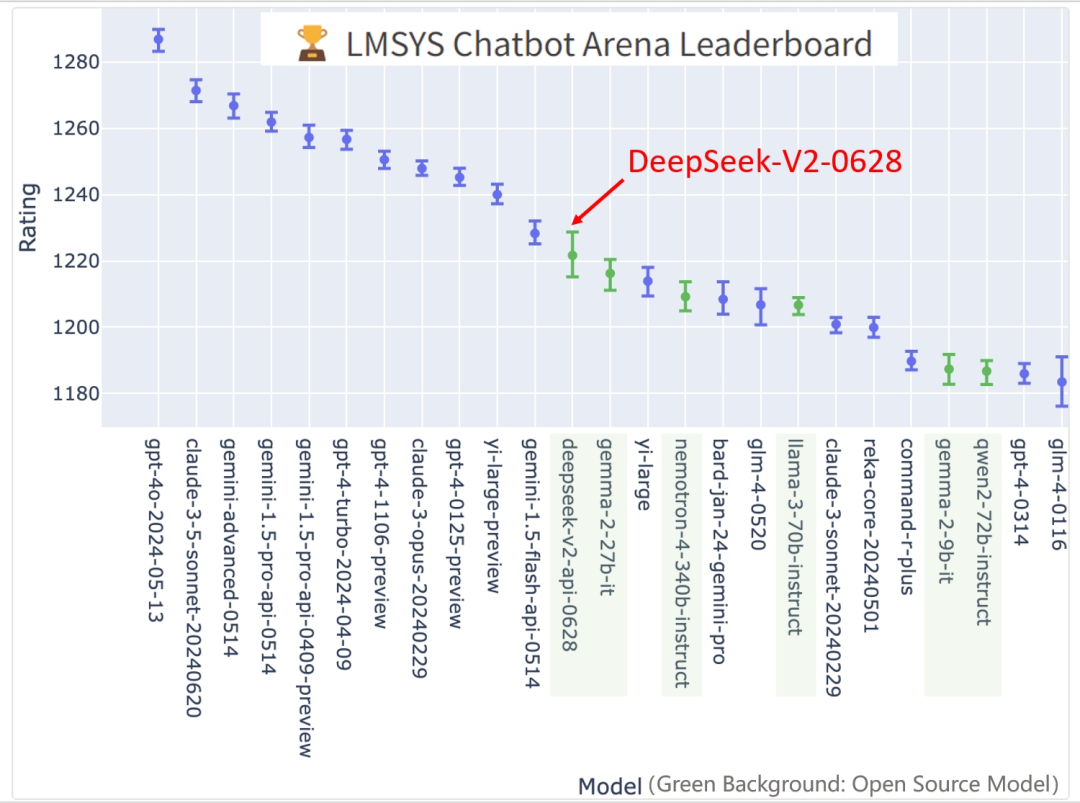
从权威的角度,通过 LMSYS Chatbot Arena Leaderboard(LMSYS Chatbot Arena Leaderboard 是一个大型语言模型的评测排行榜,提供了一个匿名竞技场,用于评估和比较不同模型的性能。) 这个大型语言模型的评测排行榜可以了解 DeepSeek 的能力如何
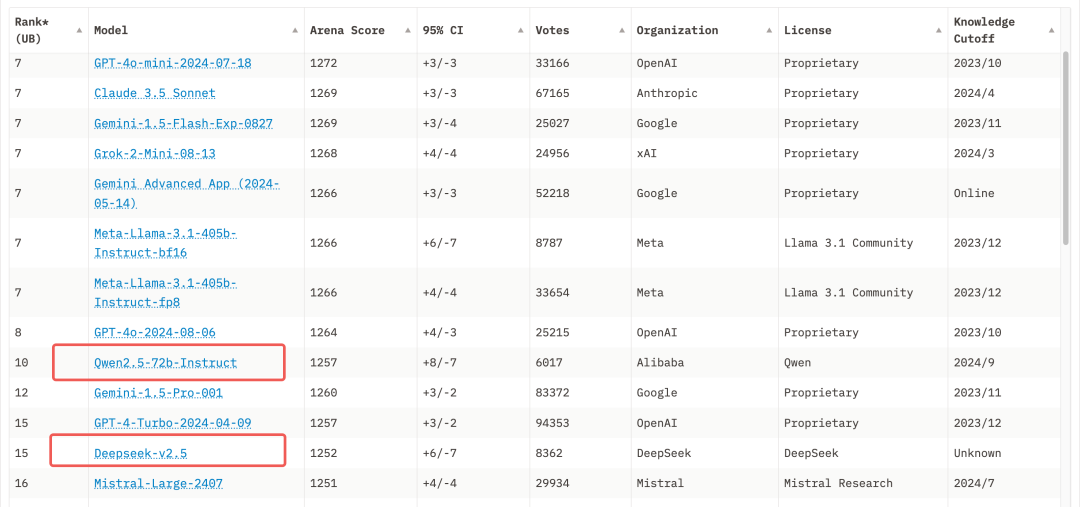
最近的几个月里,国产模型中与 DeepSeek 排名竞争最激烈的是阿里的 Qwen2.5
DeepSeek 的使用费用
前文中我们提到 DeepSeek 的 API 是需要付费调用的,所以到底收多少钱是一个关键的问题。
首先,如果你是一个新用户,那么 DeeepSeek 会送你 500w 个 tokens (在自然语言处理中,Token 是指将文本分割成的最小单位。这些单位可以是单词、子词、字符等,具体取决于所使用的分词策略)。简单理解就是 500w 个字。需要注意的是,送的 tokens 有有效期,一个月后就过期了。
其次,如果送的 tokens 用完了,就需要花真金白银去充值了。
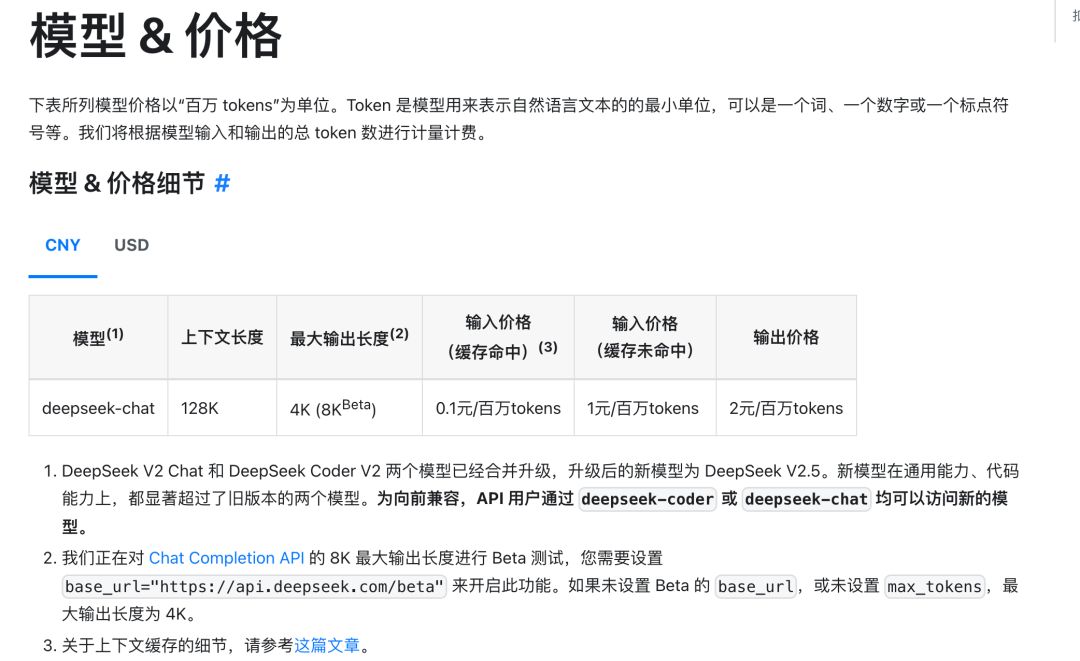
简单说, 10 元 500w tokens,如果你是个人使用,一个人放开了用,一个月足够了。
DeepSeek API 的使用
无论是通过赠送还是付费,当你拥有了 tokens,你就可以根据文档创建自己的 API key 并进行 API 调用了。
由于是走网络 API 的这种方式,在编程语言上就没有限制了,你可以选用你觉得合适的语言。DeepSeek 官方也比较贴心的给出了各种语言调用的示例:
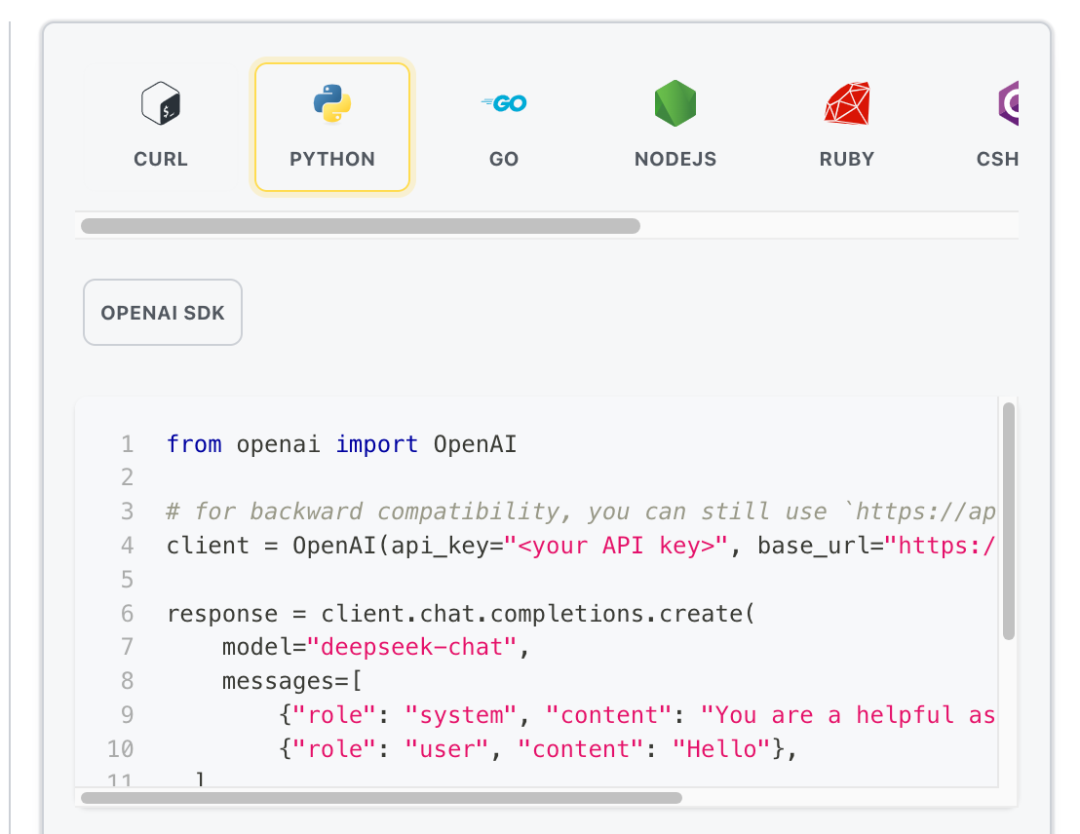
这里我用 Python 写了一个简单的调用 Demo, 以下是具体代码:
 1from openai import OpenAI
 2
 3class DeepSeekChat:
 4    def __init__(self, api_key, base_url="https://api.deepseek.com"):
 5        self.client = OpenAI(api_key=api_key, base_url=base_url)
 6
 7    def chat(
 8        self,
 9        system_message,
10        user_message,
11        model="deepseek-chat",
12        max_tokens=1024,
13        temperature=0.7,
14        stream=True,
15    ):
16
17        response = self.client.chat.completions.create(
18            model=model,
19            messages=[
20                {"role": "system", "content": system_message},
21                {"role": "user", "content": user_message},
22            ],
23            max_tokens=max_tokens,
24            temperature=temperature,
25            stream=stream,
26        )
27
28        if stream:
29            return self._stream_response(response)
30        else:
31            return response.choices[0].message.content
32
33    def _stream_response(self, response):
34        full_response = ""
35        for chunk in response:
36            if chunk.choices[0].delta.content is not None:
37                content = chunk.choices[0].delta.content
38                print(content, end="", flush=True)
39                full_response += content
40
41        print("\r\n===============我是分隔线===============")
42        return full_response
43
44# 使用示例
45if __name__ == "__main__":
46    deepseek_chat = DeepSeekChat(api_key="[你的 API Key]")
47    response = deepseek_chat.chat(
48        system_message="你是一个聪明的 AI 助手",
49        user_message="三国演义中战斗力排名前 10 的武将有谁?",
50        stream=True,
51    )
52    print("完整回答:", response)
可以看到我们只引入了 openai 这一个库,原因是 DeepSeek 的 API 和 OpenAI 的 API 是兼容的。
“
DeepSeek API 使用与 OpenAI 兼容的 API 格式,通过修改配置,您可以使用 OpenAI SDK 来访问 DeepSeek API,或使用与 OpenAI API 兼容的软件。
1 --源自 DeepSeek 文档
引入 openai 这个库以后我们不需要再引入其他多余的库就可以进行 API 请求了。
这段代码比较简单,我的问题是 :“三国演义中战斗力排名前 10 的武将有谁?” 我们来看一下大模型给我的回答:
已关注
Follow
Replay Share Like
Close
观看更多
更多
退出全屏
切换到竖屏全屏**退出全屏
小盒子的技术分享已关注
Share Video
,时长00:19
0/0
00:00/00:19
切换到横屏模式
继续播放
进度条,百分之0
00:00
/
00:19
00:19
全屏
倍速播放中
Your browser does not support video tags
继续观看
提速 RAG 应用:用 DeepSeek API 替换本地 Ollama 模型,LlamaIndex 实战解析
观看更多
Original
,
提速 RAG 应用:用 DeepSeek API 替换本地 Ollama 模型,LlamaIndex 实战解析
小盒子的技术分享已关注
Share点赞Wow
Added to Top StoriesEnter comment
RAG
在上一篇文章中我们能够方便地调用 Ollama 进而调用本地下载好的模型,是因为 LlamaIndex 的库封装好了:
1# 设置语言模型,使用 Ollama 提供的 Qwen2 7B 模型,并设置请求超时时间
2Settings.llm = Ollama(model="qwen2:7b", request_timeout=360.0)
现在,我们想用在线的模型 DeepSeek,让 LlamaIndex 去调用 DeepSeek API 就不能用之前的方式了。
LlamaIndex 支持的 LLM 集成方式
通过查看 LlamaIndex 的文档,总结来说,它支持的 LLM 集成方式有三种:
- 通过 Ollama 调用安装在本地的大模型(一般适用于个人电脑使用)
- 通过 API 调用的免费或付费模型
- 自定义 LLM
我们需要解释一下:
第一种方式 : Ollama 无需多言。
第二种方式 : API 付费调用不是所有市面上的模型 LlamaIndex 都有现成的集成方式,比如 DeepSeek 就没有,具体支持集成哪些模型,在它的文档中有清单:https://docs.llamaindex.ai/en/stable/module_guides/models/llms/modules/ 另外,对于付费模型,模型背后的公司都会提供相应的 API,付费购买就可以了,而开源模型虽然本身代码是开源的,但提供模型调用服务的平台是收费的,比如
Replicate
也就是说第二种方式无论你使用的模型本身是否开源,提供模型调用服务的平台都会收费。
第三种方式:自定义 LLM,本文我们使用的就是这种方式 ,这种集成实现方式是 LlamaIndex 留给开发者的一个扩展,我们可以自定义自己需要使用的 LLM 与 LlamaIndex 进行集成。使用这种方式可以实现两类集成:
第一类就是类似 DeepSeek 这种已经有 API 但 LlamaIndex 尚未支持的 LLM。
第二类就是调用我们本地部署的开源大模型,当然一般是部署在服务器上(如果 PC 有足够的计算资源也可以部署在 PC 上)
Custom LLM
如何通过 Custom LLM 的方式将 DeepSeek 与 LlamaIndex 进行集成呢?
其实很容易,我们只需要创建一个类并实现三个方法即可(用 python 代码实现)。
文档中给出的代码是这样的:
 1from typing import Optional, List, Mapping, Any
 2
 3from llama_index.core import SimpleDirectoryReader, SummaryIndex
 4from llama_index.core.callbacks import CallbackManager
 5from llama_index.core.llms import (
 6    CustomLLM,
 7    CompletionResponse,
 8    CompletionResponseGen,
 9    LLMMetadata,
10)
11from llama_index.core.llms.callbacks import llm_completion_callback
12from llama_index.core import Settings
13
14class OurLLM(CustomLLM):
15    context_window: int = 3900
16    num_output: int = 256
17    model_name: str = "custom"
18    dummy_response: str = "My response"
19
20    @property
21    def metadata(self) -> LLMMetadata:
22        """Get LLM metadata."""
23        return LLMMetadata(
24            context_window=self.context_window,
25            num_output=self.num_output,
26            model_name=self.model_name,
27        )
28
29    @llm_completion_callback()
30    def complete(self, prompt: str, **kwargs: Any) -> CompletionResponse:
31        return CompletionResponse(text=self.dummy_response)
32
33    @llm_completion_callback()
34    def stream_complete(
35        self, prompt: str, **kwargs: Any
36    ) -> CompletionResponseGen:
37        response = ""
38        for token in self.dummy_response:
39            response += token
40            yield CompletionResponse(text=response, delta=token)
41
42# define our LLM
43Settings.llm = OurLLM()
44
45# define embed model
46Settings.embed_model = "local:BAAI/bge-base-en-v1.5"
47
48# Load the your data
49documents = SimpleDirectoryReader("./data").load_data()
50index = SummaryIndex.from_documents(documents)
51
52# Query and print response
53query_engine = index.as_query_engine()
54response = query_engine.query("<query_text>")
55print(response)
OurLLM 就是要创建的类,要实现的三个方法是:
- metadata
- complete
- stream_complete
实际上一般 metadata 方法可以直接返回 LLMMetadata() ,最主要的就是实现后面两个方法。
实例
根据上一节 Custom LLM 所述,我将上一篇文章中的 Ollama 模型调用换成自定义的 DeepSeek,以下是主要代码:
  1import os
  2import sys
  3import logging
  4from openai import OpenAI
  5from typing import Any, Generator
  6from llama_index.core import VectorStoreIndex, SimpleDirectoryReader, Settings
  7from llama_index.embeddings.huggingface import HuggingFaceEmbedding
  8from llama_index.core.llms import (
  9    CustomLLM,
 10    CompletionResponse,
 11    CompletionResponseGen,
 12    LLMMetadata,
 13)
 14from llama_index.core.llms.callbacks import llm_completion_callback
 15from pydantic import BaseModel, Field
 16from dotenv import load_dotenv
 17from functools import cached_property
 18
 19# 配置日志 创建一个与当前模块同名的 logger
 20logging.basicConfig(level=logging.INFO)
 21logger = logging.getLogger(__name__)
 22
 23# 从环境变量获取 API 密钥
 24load_dotenv()
 25
 26API_KEY = os.getenv("DEEPSEEK_API_KEY")
 27if not API_KEY:
 28    raise ValueError("DEEPSEEK_API_KEY environment variable is not set")
 29
 30class DeepSeekChat(BaseModel):
 31    """DeepSeek 聊天模型的封装类。"""
 32
 33    api_key: str = Field(default=API_KEY)
 34    base_url: str = Field(default="https://api.deepseek.com")
 35
 36    class Config:
 37        """Pydantic 配置类。"""
 38
 39        arbitrary_types_allowed = True  # 允许模型接受任意类型的字段
 40        # 这增加了灵活性,但可能降低类型安全性
 41        # 在本类中,这可能用于允许使用 OpenAI 客户端等复杂类型
 42
 43    @cached_property
 44    def client(self) -> OpenAI:
 45        """创建并缓存 OpenAI 客户端实例。"""
 46        return OpenAI(api_key=self.api_key, base_url=self.base_url)
 47
 48    def chat(
 49        self,
 50        system_message: str,
 51        user_message: str,
 52        model: str = "deepseek-chat",
 53        max_tokens: int = 1024,
 54        temperature: float = 0.7,
 55        stream: bool = False,
 56    ) -> Any:
 57        """
 58        使用 DeepSeek API 发送聊天请求。
 59
 60        返回流式响应或完整响应内容。
 61        """
 62        try:
 63            response = self.client.chat.completions.create(
 64                model=model,
 65                messages=[
 66                    {"role": "system", "content": system_message},
 67                    {"role": "user", "content": user_message},
 68                ],
 69                max_tokens=max_tokens,
 70                temperature=temperature,
 71                stream=stream,
 72            )
 73            return response if stream else response.choices[0].message.content
 74        except Exception as e:
 75            logger.error(f"Error in DeepSeek API call: {e}")
 76            raise
 77
 78    def _stream_response(self, response) -> Generator[str, None, None]:
 79        """处理流式响应,逐块生成内容。"""
 80        for chunk in response:
 81            if chunk.choices[0].delta.content is not None:
 82                yield chunk.choices[0].delta.content
 83
 84class DeepSeekLLM(CustomLLM):
 85    """DeepSeek 语言模型的自定义实现。"""
 86
 87    deep_seek_chat: DeepSeekChat = Field(default_factory=DeepSeekChat)
 88
 89    @property
 90    def metadata(self) -> LLMMetadata:
 91        """返回 LLM 元数据。"""
 92        return LLMMetadata()
 93
 94    @llm_completion_callback()
 95    def complete(self, prompt: str, **kwargs: Any) -> CompletionResponse:
 96        """执行非流式完成请求。"""
 97        response = self.deep_seek_chat.chat(
 98            system_message="你是一个聪明的 AI 助手", user_message=prompt, stream=False
 99        )
100        return CompletionResponse(text=response)
101
102    @llm_completion_callback()
103    def stream_complete(self, prompt: str, **kwargs: Any) -> CompletionResponseGen:
104        """执行流式完成请求。"""
105        response = self.deep_seek_chat.chat(
106            system_message="你是一个聪明的 AI 助手", user_message=prompt, stream=True
107        )
108
109        def response_generator():
110            """生成器函数,用于逐步生成响应内容。"""
111            response_content = ""
112            for chunk in self.deep_seek_chat._stream_response(response):
113                if chunk:
114                    response_content += chunk
115                    yield CompletionResponse(text=response_content, delta=chunk)
116
117        return response_generator()
118
119# 设置环境变量,禁用 tokenizers 的并行处理,以避免潜在的死锁问题
120os.environ["TOKENIZERS_PARALLELISM"] = "false"
121
122def main():
123    """主程序函数,演示如何使用 DeepSeekLLM 进行文档查询。"""
124    # 从指定目录加载文档数据
125    documents = SimpleDirectoryReader("data").load_data()
126
127    # 设置 LLM 和嵌入模型
128    Settings.llm = DeepSeekLLM()
129    Settings.embed_model = HuggingFaceEmbedding(model_name="BAAI/bge-base-zh-v1.5")
130
131    # 创建索引和查询引擎
132    index = VectorStoreIndex.from_documents(documents)
133    query_engine = index.as_query_engine(streaming=True)
134
135    # 执行查询
136    print("查询结果:")
137    response = query_engine.query("作者学习过的编程语言有哪些?")
138
139    # 处理并输出响应
140    if hasattr(response, "response_gen"):
141        # 流式输出
142        for text in response.response_gen:
143            print(text, end="", flush=True)
144            sys.stdout.flush()  # 确保立即输出
145    else:
146        # 非流式输出
147        print(response.response, end="", flush=True)
148
149    print("\n 查询完成")
150
151if __name__ == "__main__":
152    main()
你别看代码写的长,那是因为我做过重构,其实可以实现的更短。不要被篇幅吓到,其实主要执行逻辑与上一篇文章中写的没什么区别,只在自定义 DeepSeekLLM 这里有所不同,如果你把本文从头看到尾,其实其中的第一步分解拆开都有解释过,也比较简单。
我们来看一下效果,测试数据仍然是上一篇文章中的文本内容,问题仍然是 :“作者学习过的编程语言有哪些?”
已关注
Follow
Replay Share Like
Close
观看更多
更多
退出全屏
切换到竖屏全屏**退出全屏
小盒子的技术分享已关注
Share Video
,时长00:09
0/0
00:00/00:09
切换到横屏模式
继续播放
进度条,百分之0
00:00
/
00:09
00:09
全屏
倍速播放中
Your browser does not support video tags
继续观看
提速 RAG 应用:用 DeepSeek API 替换本地 Ollama 模型,LlamaIndex 实战解析
观看更多
转载
,
提速 RAG 应用:用 DeepSeek API 替换本地 Ollama 模型,LlamaIndex 实战解析
小盒子的技术分享已关注
Share点赞Wow
Added to Top StoriesEnter comment
总结
本文我们介绍了如何通过调用国产大模型 DeepSeek 的 API 来提升 RAG(检索增强生成)应用的执行效率。相比使用本地 Ollama 模型,DeepSeek 的 API 不仅解决了本地计算资源不足导致的运行速度慢的问题,还保持了高质量的生成结果。DeepSeek 在成本和效果上表现出色,特别适合中文模型的应用。通过自定义 LLM 的方式,我们成功将 DeepSeek 与 LlamaIndex 集成,展示了如何实现高效的数据处理和生成。本文提供的方法和示例代码为构建高性能 RAG 应用提供了一种实用的解决方案。